

Everything in detection and response starts with the security operations center (SOC). It serves as the launching point for many cybersecurity careers, with the security analyst serving as an expert in beginner’s clothing. Organizations depend on security analysts to recognize, classify, investigate, and respond to threats. Per our 2021 State Of Enterprise Breaches report, 63% of organizations surveyed were breached in the past 12 months, and it takes a median of 37 days and a mean of $2.4 million to recover from a breach. The numbers prove that the SOC matters.
But security analysts find themselves equipped with woefully inadequate tools, considering the criticality of the tasks they perform. When SOC analysts sit down in the (swivel) chair for the 8- to 12-hour shift, before they ever see adversary activity, their battle begins … against the technology and processes they have to use. This includes siloed data, horrid integrations, user interfaces that are poorly stitched together from multiple acquisitions masquerading as platforms, and “expert systems” that are both hard to use and hard to master.
That backdrop helped us identify a new — and necessary — trend of security products and services that focus on improving the SOC overall and security analyst workflow: analyst experience (AX).
anywhere world.
The gaps to be filled
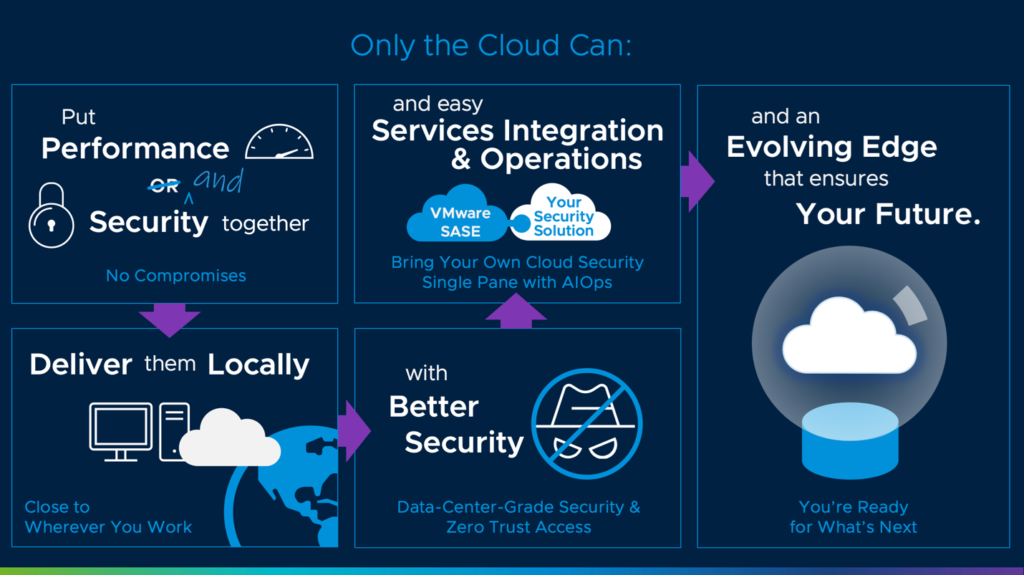
Organizations need comprehensive defense against the proliferation of malware and ransomware both within and across their SaaS applications. This requires the use of a security solution architected for the modern, cloud world and capable of defending against malware for any user, any device, and any app over any network (without the need to backhaul traffic to an appliance on premises). Such a solution needs to be able to prevent infected files from being uploaded to cloud applications, but it also must be able to identify threats that have already made their way into the cloud. Organizations must also be able to trust that their solution of choice can defend against any threat, including zero-day ransomware, and not just known malware. In the event of (increasingly common) double-extortion attacks, organizations need to be able to defend their data from being exfiltrated via SaaS, as well.
- Keep the devices updated with the most current software and antivirus programs.
Software updates to mobile devices often include patches for various security holes, so it’s best practice to install the updates as soon as they’re available.
There are many options to choose from when it comes to antivirus software for mobile devices, so it comes down to preference. Some are free to use, while others charge a monthly or annual fee and often come with better support. In addition to antivirus support, many of these programs will monitor SMS, MMS and call logs for suspicious activity and use blacklists to prevent users from installing known malware to the device.
- Backup device content on a regular basis.
Just like your computer data should be backed up regularly, so should the data on your company’s mobile devices. If a device is lost or stolen, you’ll have peace of mind knowing your valuable data is safe.
- Choose passwords carefully.
The average Internet user has about 25 accounts to maintain and an average of 6.5 different passwords to protect them, according to a recent Microsoft study. Obviously, this lack of security awareness is what hackers count on to steal data. Use the following tips to ensure your mobile device passwords are easy to remember and hard to guess:
- Require employees to change the device’s login password every 90 days.
- Passwords should be at least eight characters long and include uppercase letters and special characters, such as asterisks, ampersands and pound signs.
- Don’t use names of spouses, children or pets in the password. A hacker can spend just a couple minutes on a social media site to figure out this information.
We’ve seen some of the features that make JSON applications such as RESTful APIs more reliable than others, and the best places to go to learn about Lambda are Google Developer Tools (developerspaces), CloudDB, and AWS Lambda. To give you some basic recommendations, here’s how to use Lambda as a library to build services, service lifecycle management (SIL), and APIs that require no special setup.
In this section, we’ve summarized each of those features and their specific use cases.
Javascript
We’ll work with JSF’s RESTful API to provide a common API for data collection and retrieval. From there, we can create JSF services that can return either a JSON or a JSON-API document. These services are written in JavaScript, but we can also use JSF’s JSON API as a library.
The best way to get a real understanding over these services, is via the JIT API. The JIT API represents all the JSF implementations that you can use or integrate with JSF. It contains all the available JVM, ES6, and JavaScript implementations and provides two ways you can interact with the service:
In a JIT application, you perform various action (e.g., submit the request). In order to perform this action, you specify a command to
We’ve seen some of the features that make JSON applications such as RESTful APIs more reliable than others, and the best places to go to learn about Lambda are Google Developer Tools (developerspaces), CloudDB, and AWS Lambda. To give you some basic recommendations, here’s how to use Lambda as a library to build services, service lifecycle management (SIL), and APIs that require no special setup.
In this section, we’ve summarized each of those features and their specific use cases.
Javascript
We’ll work with JSF’s RESTful API to provide a common API for data collection and retrieval. From there, we can create JSF services that can return either a JSON or a JSON-API document. These services are written in JavaScript, but we can also use JSF’s JSON API as a library.
The best way to get a real understanding over these services, is via the JIT API. The JIT API represents all the JSF implementations that you can use or integrate with JSF. It contains all the available JVM, ES6, and JavaScript implementations and provides two ways you can interact with the service:
In a JIT application, you perform various action (e.g., submit the request). In order to perform this action, you specify a command to
We’ve seen some of the features that make JSON applications such as RESTful APIs more reliable than others, and the best places to go to learn about Lambda are Google Developer Tools (developerspaces), CloudDB, and AWS Lambda. To give you some basic recommendations, here’s how to use Lambda as a library to build services, service lifecycle management (SIL), and APIs that require no special setup.
In this section, we’ve summarized each of those features and their specific use cases.
Javascript
We’ll work with JSF’s RESTful API to provide a common API for data collection and retrieval. From there, we can create JSF services that can return either a JSON or a JSON-API document. These services are written in JavaScript, but we can also use JSF’s JSON API as a library.
The best way to get a real understanding over these services, is via the JIT API. The JIT API represents all the JSF implementations that you can use or integrate with JSF. It contains all the available JVM, ES6, and JavaScript implementations and provides two ways you can interact with the service:
In a JIT application, you perform various action (e.g., submit the request). In order to perform this action, you specify a command to